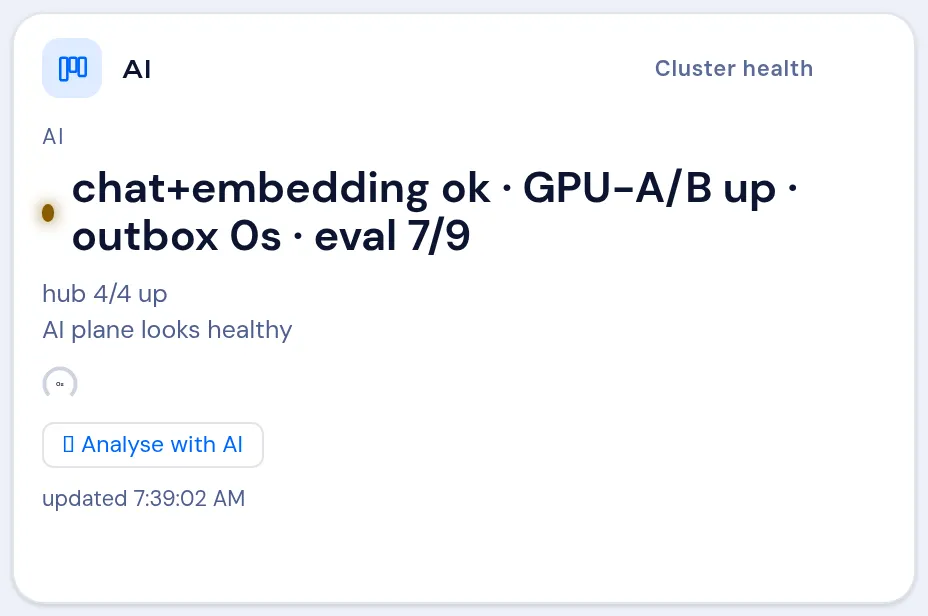
The Kubernaut console (cluster health)
Kubernaut is an administrator-only set of operator portlets on the board that report the health of the platform your VNClagoon instance runs on. They are grouped under Cluster health in the portlet catalog.
Visible to administrators only. The Cluster health portlets are gated by role — a tenant, organisation or instance administrator sees them in the catalog; for everyone else they simply do not appear. Add them from the portlet catalog like any other card.
The dashlets
Section titled “The dashlets”Each Cluster health dashlet covers one stability factor:
| Dashlet | Watches |
|---|---|
| Alerts | Firing alerts on the platform. |
| GitOps | Sync and drift of the platform’s apps. |
| Nodes | Node readiness and pressure. |
| Certificates | TLS certificate validity and renewals. |
| Backups / DR | Backup freshness and disaster-recovery state. |
| The mail service. | |
| Services | Core services answering. |
| Disk | Filesystem headroom. |
| Pod capacity | Pod scheduling headroom. |
| AI | The AI tier. |
| Storage (Longhorn storage) | Storage volume health. |
| Databases (CNPG DB HA) | Database-cluster health and high availability. |
| Source control (Gitea) | The source host. |
| Control plane (Control plane / etcd) | The cluster control plane. |
| Secrets & tokens | Service-credential liveness. |
A dashlet shows a short status headline (for example a count or OK) and, where a metric exists, a small chart drawn inline. A dashlet that cannot reach its data shows Kubernaut data unavailable.
In-flight operations
Section titled “In-flight operations”A dashlet also shows the operator tasks that are in progress on this instance right now, in a small In progress banner above the dashlet body: one line per task with its title, and the operator who started it when one is recorded. The banner is the same on every dashlet and disappears when nothing is in progress; the board picks it up on its normal refresh.
Analyse with AI
Section titled “Analyse with AI”Each dashlet has an Analyse action that asks the assistant for a short diagnosis and a suggested fix. The fix is shown as commands you can copy.
The analysis is strictly read-only — it only proposes commands; it never executes anything. You run a command yourself, if you decide to.