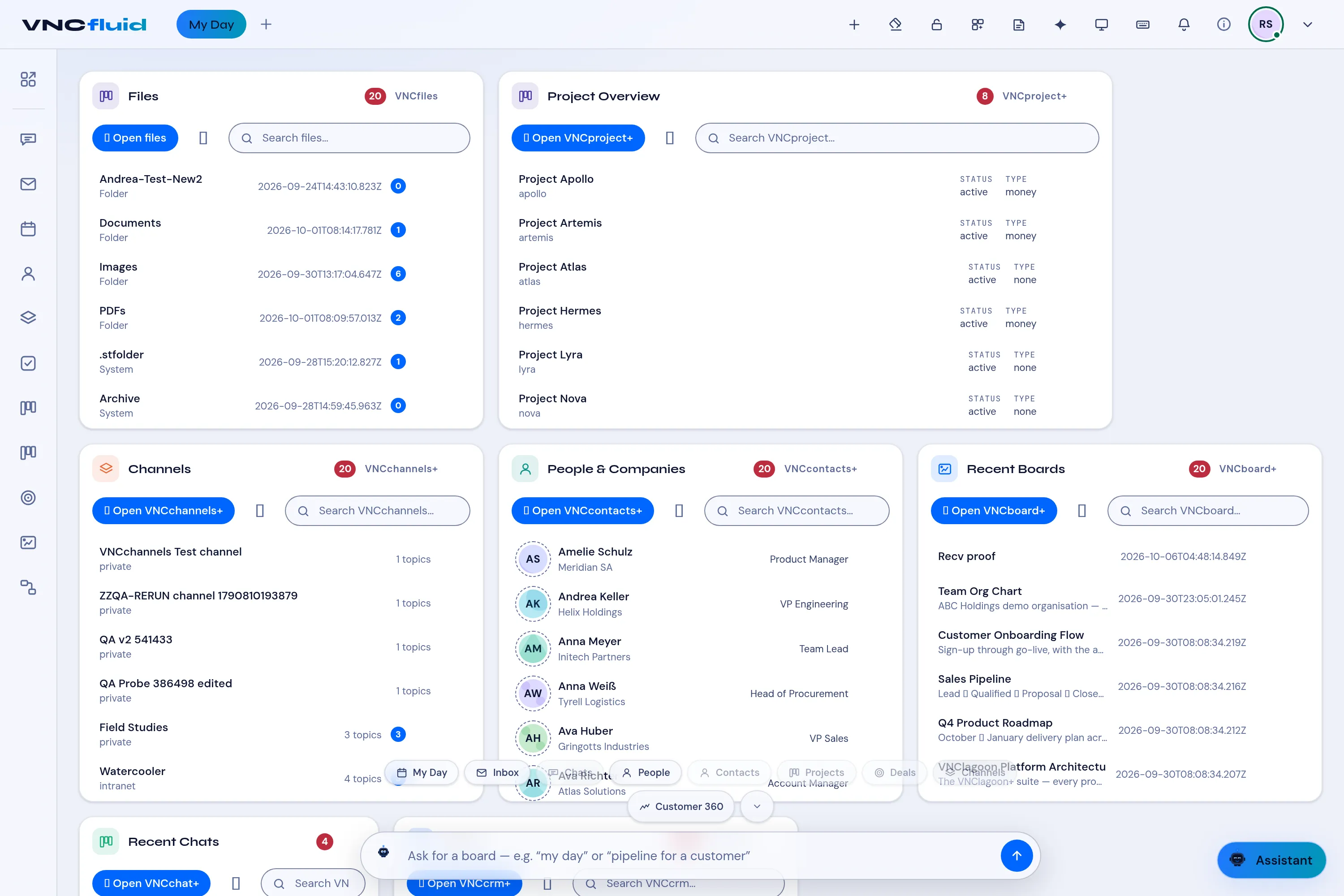
Your My Day dashboard
My Day is the VNCfluid home. It is a dashboard of cards, each showing a slice of your work across the suite — so you do not have to open every app.
What the cards show
Section titled “What the cards show”- Project Overview — projects from VNCproject with status and type.
- Channels — your VNCchannels spaces and their topic counts.
- People & Companies — contacts from VNCcontacts.
- Recent Boards — boards you worked on in VNCboard.
- Recent Chats — conversations from VNCchat.
- Deals — your VNCcrm pipeline.
- Calendar Agenda — upcoming events from your VNCmail calendar.
The Portlet catalog (grid icon, top bar) has more cards: Inbox, Task List, Workflows, App Launcher and others.
- Open VNCfluid. My Day is selected by default.
- Use a card’s Search box to filter it, or Open … to jump to the app.
- Open the Portlet catalog (grid icon, top bar) to add another card to your dashboard.
- In the bar at the bottom, type a request — for example my day or pipeline for a customer — or pick a quick chip (My Day, Inbox, Chats, People, Deals, …).