Use the notification rail
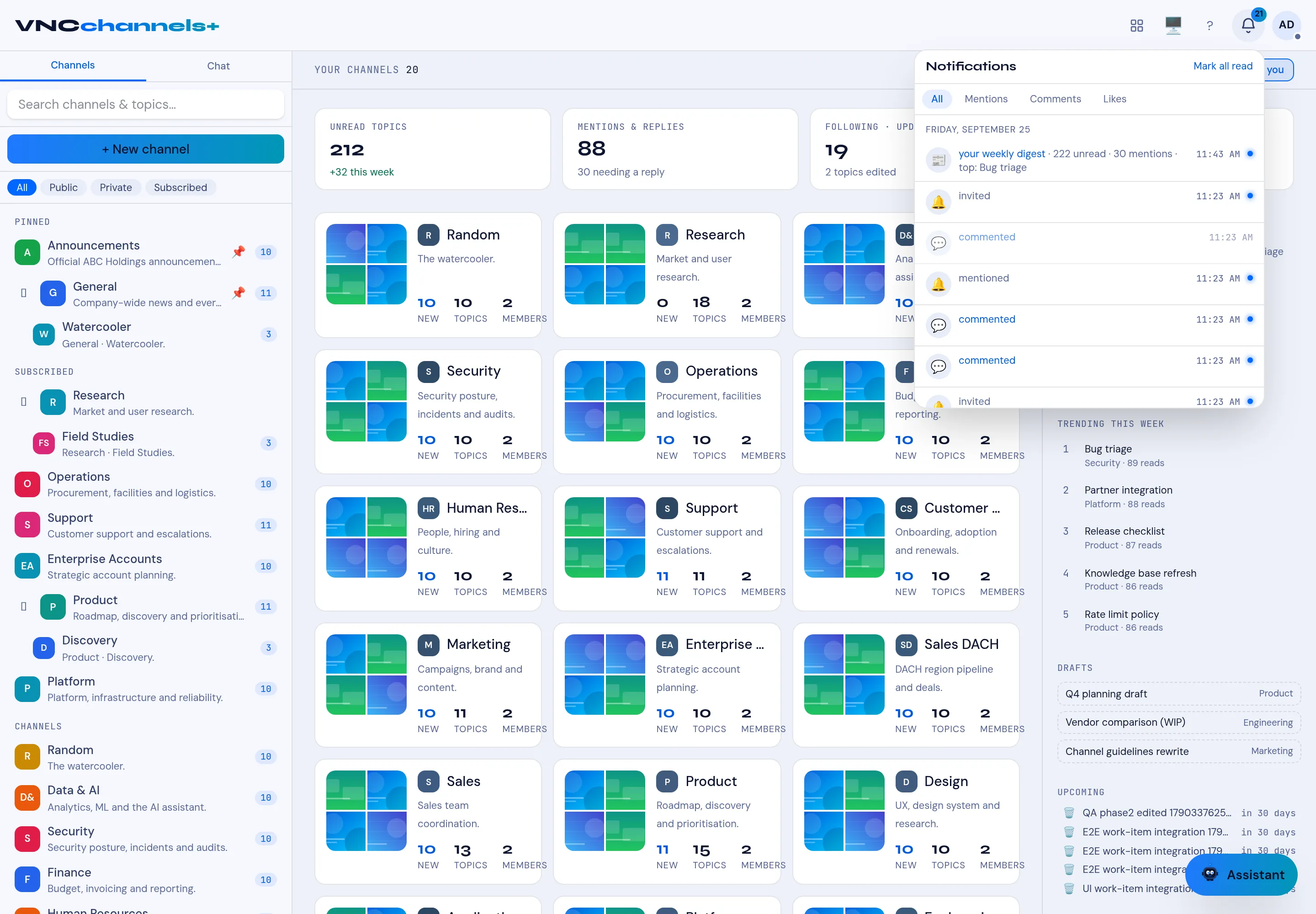
The bell in the top bar collects mentions, comments, likes and invitations across your channels. The home page also shows a For you summary.
- Select the Notifications bell in the top bar. The badge shows unread items.
- Filter with All, Mentions, Comments or Likes.
- Select an entry to open the topic or comment it refers to.
- Select Mark all read to clear the list.
- To verify the rail is working, select Send test notification in the notification settings. A test message is delivered to your rail and you can see it appear.
Result
Section titled “Result”The list is grouped by day, with an unread dot on new items. The home page’s For you rail mirrors the most important entries, and Unread topics in the KPI band counts what is still open.
Across the suite and on your desktop
Section titled “Across the suite and on your desktop”- Notification center — open your avatar (top right) → Notifications to see alerts from every VNClagoon app you use, not only VNCchannels, with an All / per-app filter and Mark all read.
- Desktop app — install VNClagoon Notifications from Get the app in the top bar to receive native OS notifications from VNCchannels and the other apps. It has Show notification text and Play sound toggles and a Do Not Disturb pause; the bell and the avatar menu always show the same items.